AI Automation and Scheduled Tasks: How I Get Hours Back with ChatGPT

I used to finish my agency work, sit down to build the Chris Good Empire, and lose an hour or two looking for potential clients and writing emails. I don’t like cold calling. I don’t particularly like selling. I’d much rather be the technical lead. But if you’re building a business, somebody has to do it.
Now, on a Wednesday, I open a shortlist that’s already been researched and scored. There are links to the evidence and, where there’s a good reason to get in touch, an email waiting in Gmail Drafts. I read it, maybe make it a bit more forward, and decide whether to hit send. My part takes less than ten minutes.
The copy-and-paste version of AI
You know the routine. Write an email, paste it into ChatGPT, ask it to tidy it up, tweak the result and paste it back into Gmail. Or a client sends you a blog that you suspect came out of ChatGPT in the first place, and you take it into Gemini or ChatGPT to give it another pass. Or you download a CSV from Google Search Console and ask AI what it can see in the numbers.
I still do all of that. It helps. But I’m the one fetching the material and carrying it from one step to the next.
Say Rachel sends me a blog draft. I could give AI permission to find her email, tell it where to get the SEO data, and ask it to bring me back a revised article with a short explanation of what it changed and why. If it can access the right Search Console property, it can use that data. If I’m working from an export, I need to make that export available. Either way, I’ve given it a brief for the whole job, and I get to spend my time reviewing the work.
The 10–80–10 works here too
I’ve talked about this for web design, but it applies just as well to an email or an SEO task.
- The first 10% is mine. I define the outcome, give it the sources and permissions it needs, and tell it where to stop.
- The middle 80% is AI-assisted. It gathers the material, follows up on what it finds and puts something together for me to review.
- The final 10% is mine again. I check the evidence, make the higher-level calls and decide what goes out.
The percentages are shorthand for who does what. It’s a bit like becoming the lead on a job. You’re still responsible for what goes out, but you’re spending more of your time deciding what’s good enough to go out.
Moments of agentic genius
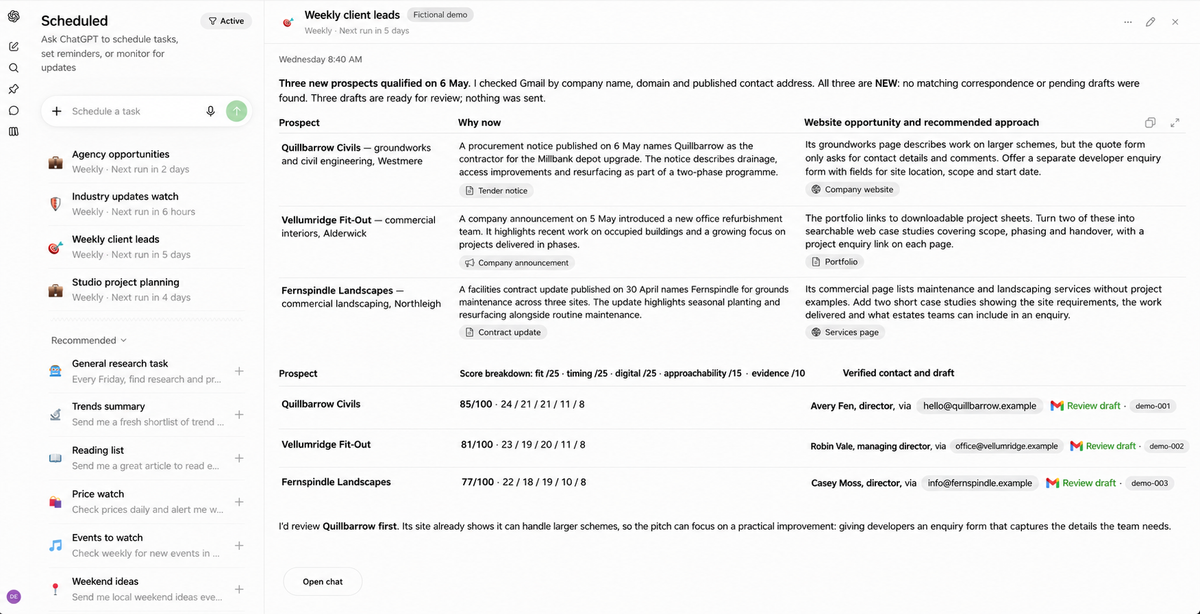
With the Boosh Digital leads task, I told ChatGPT what a good prospect looks like. It should find an established business with a reason to be worth approaching now, such as a contract award or an expansion. It should connect that signal to a specific website or SEO opportunity, score the prospect, check my Gmail history, and draft an email only if there’s a good fit and a verified contact.
I didn’t give it a list of sites to search. On one run it found a public procurement notice for a groundworks firm, then followed that lead to the firm’s website. The site showed that the firm could handle large housing schemes, but its enquiry form barely asked for anything beyond contact details and comments. That gave the email an actual reason to exist: could the form give developers somewhere to enter the site location, scope and start date up front?
That’s what I mean by a moment of agentic genius. The routine is repeatable, and there are points where the AI has to make a judgement about what to follow and what’s worth saying. There’s also a clear stop point. It saves the draft. I make the call on sending it.
Once it works, schedule it
I started doing this with security updates too. I was spending part of the morning looking for WordPress and PHP advisories. Now I can sit down with my coffee and see whether anything material has been flagged, with links to the official notices and the checks I need to prioritise. I still have to confirm what versions the sites and servers are actually running. I’ve offloaded the daily trawl.
If you’ve got a task like that, here’s the kick up the bum. Pick one thing you keep doing. Give ChatGPT Work the brief, the sources and a point to stop. Run it once and see what comes back. If you’d happily review that same output next week, ask ChatGPT to schedule it and check the saved instructions in Scheduled.
Try it yourself
Download the free guide to Chat, Work and Scheduled Tasks. It shows how scheduled tasks work and gives you a starter prompt to try. [Add the public PDF link to the download text.]
If you want my full lead workflow, it’s inside Digital Builders Community. You get the walkthrough PDF and the starter prompt that interviews you, one question at a time, and builds a version around your own business and how you want to approach people.
That’s the sort of thing I want Digital Builders Community to be for. We try things in our own work, share the refinements that are making a difference, and let other builders show us where we could do it better.
Get your Chat, Work & Scheduled Tasks Guide!
Preferred sources
Follow my work in Google
Add chrisgood.online as a preferred source and my insights get pushed up your Google Search, News and Discover results.